
Every empty chair in your salon, clinic, or consulting office has a cost — and most of those empty chairs were booked. The customer simply didn’t show. If you’ve been fighting no-shows with email nudges and SMS blasts that go unread, the problem may not be your reminder strategy. It may be your reminder channel.
WhatsApp appointment reminders have quietly become the most effective way for service businesses to keep their calendars full. Messages land where customers already spend their day, get read within minutes, and let people confirm or reschedule with a single tap. In this guide, you’ll learn exactly why WhatsApp appointment reminders outperform every other channel, how to time and write them, and how to set up an automated system that runs without you lifting a finger.
What Are WhatsApp Appointment Reminders?
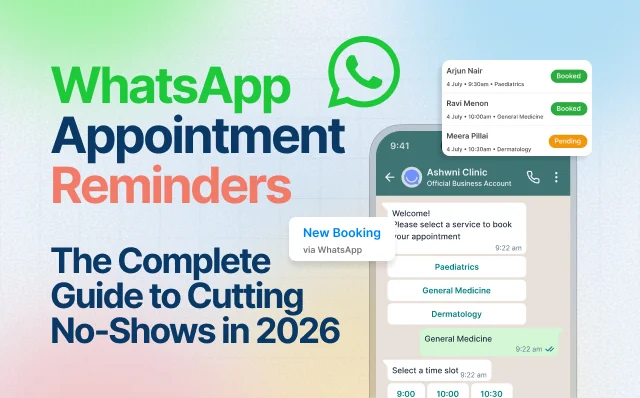
WhatsApp appointment reminders are automated messages sent to customers through the WhatsApp Business Platform (the official Meta API) to remind them of an upcoming booking. Unlike a plain text reminder, a WhatsApp reminder can include interactive buttons — Confirm, Reschedule, or Cancel — so the customer responds instantly without calling your front desk or opening a separate booking page.
A typical reminder flow looks like this: a confirmation message goes out the moment someone books, followed by scheduled nudges at set intervals before the appointment. Each message is personalized with the customer’s name, service, staff member, date, time, and location. Because these run on the official WhatsApp Business API, they’re sent from your verified business number — reliable, compliant, and instantly recognizable to the recipient. (Meta lays out the underlying platform in its WhatsApp Business Platform documentation.)
Why No-Shows Are Costing You More Than You Think
Before we get into reminders, it helps to understand the scale of the problem they solve. No-shows aren’t a minor annoyance — they’re a steady drain on revenue.
Across service industries, the average no-show rate is around 23%, with healthcare and dental practices topping the list at 27 to 30%. That figure is well documented in peer-reviewed research — a widely cited systematic review in BMC Health Services Research reports similar averages across dozens of studies. In other words, roughly one in four booked appointments never happens. For a single physician, missed appointments add up to an estimated $67,000 in lost revenue annually, and across the U.S. healthcare system the total cost runs to an estimated $150 billion per year.
The reasons people miss appointments are surprisingly consistent. Forgetfulness accounts for 38% of no-shows and scheduling conflicts for another 26% — both problems a timely, well-placed reminder can largely solve. The catch is that the reminder has to actually be seen. And that’s precisely where traditional channels fall apart.
Why WhatsApp Beats Email and SMS for Reminders
The single biggest advantage of WhatsApp appointment reminders is simple: people read them.
Email reminders are notoriously easy to ignore. Reminder emails go unread in up to 80% of cases, buried under promotions and newsletters. WhatsApp is the opposite — it boasts roughly a 98% open rate, making it one of the most effective channels for reaching customers. Compared head to head, WhatsApp messages are read at around 95% versus 20% for email — roughly five times more likely to be opened.
Speed matters too. Most people check their messaging apps constantly, so a WhatsApp reminder reaches them in real time, when they’re most receptive, instead of sitting unread for hours or days like an email. That immediacy is what turns a reminder into a completed appointment.
The results back it up. Businesses using automated WhatsApp reminders and follow-ups report no-show reductions of up to 60%, and interactive reminders with confirm and reschedule buttons can cut no-show rates by up to 50%. Even at the conservative end, cutting no-shows by 40% transforms a calendar’s economics.
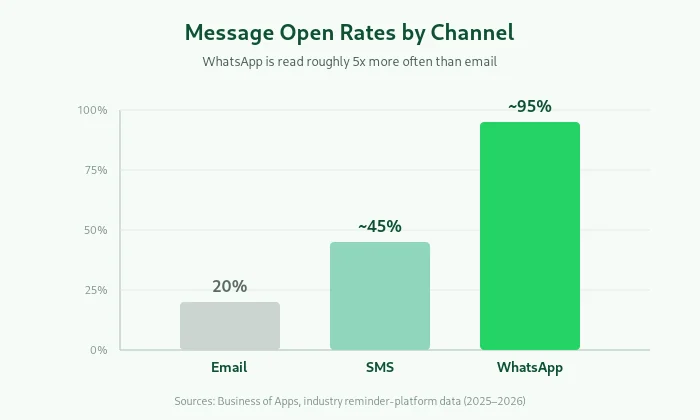
Here’s how the channels stack up:
| Channel | Typical open rate | Interactive buttons | Two-way replies |
|---|---|---|---|
| ~20% | No | Rarely | |
| SMS | 45–98% | Limited | Extra cost |
| ~95–98% | Yes (Confirm / Reschedule / Cancel) | Native |
This is the same read-rate advantage that makes Click-to-WhatsApp ads so effective for lead generation — when your message lands in WhatsApp instead of an inbox, it actually gets seen. The reminder is simply that principle applied to your calendar.
When to Send WhatsApp Appointment Reminders
Timing is where most reminder strategies quietly succeed or fail. Send too few and customers forget; send too many and you feel intrusive. The research points to a clear sweet spot.
Two to three reminders is the ideal cadence — more than three starts to feel intrusive. A proven sequence pairs an early heads-up with a final nudge close to the appointment. For healthcare and high-value bookings especially, the recommendation is to send reminders 24 hours and 2 hours before the scheduled time.
A reliable three-touch cadence looks like this:
- Confirmation at booking — sent instantly, so the appointment is locked in and the details are on record.
- 48-hour reminder — early enough that a customer who can’t make it will reschedule, giving you time to fill the slot.
- 2-hour reminder — a final same-day nudge with one-tap Confirm, Reschedule, or Cancel.
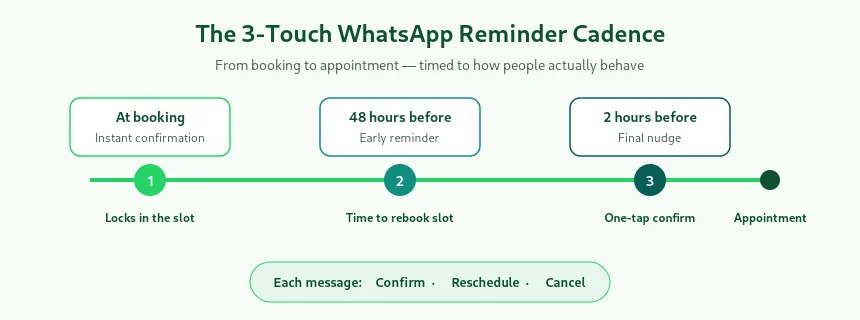
That early-cancellation window is the quiet hero of the whole system. <cite index=”14-1″>Including a reschedule or cancel option actually reduces no-shows, because clients who can’t make it will cancel in advance instead of simply not showing up</cite> — turning a dead slot into a rebookable one.
What Makes a Great WhatsApp Reminder Message
The best reminders are short, personal, and actionable. Every message should answer three questions at a glance: When is it? Where is it? What do I do if plans change?
Best practices from high-performing reminder programs come down to a few principles: keep messages personal, send them at the right time, use clear language, and avoid over-messaging. For appointment reminders specifically, it helps to include all essential details — provider name, time, location, and any preparation instructions — and add a reschedule button to reduce last-minute cancellations.
WhatsApp Reminder Message Templates
Here are ready-to-adapt templates for common scenarios. Replace the bracketed variables with your own details.
Confirmation (sent at booking):
Hi [Name] 👋 Your [Service] with [Staff] is confirmed for [Day, Date] at [Time]. 📍 [Location]. Need to make a change? Just tap below. [Reschedule] [Cancel]
48-hour reminder:
Hi [Name], a quick reminder — your [Service] is coming up on [Day] at [Time] with [Staff]. Looking forward to seeing you! Can’t make it? Tap Reschedule and we’ll find a better slot. [Confirm] [Reschedule] [Cancel]
2-hour reminder:
Almost time, [Name]! Your [Service] is today at [Time], [Location]. See you soon 🙌 [Confirm] [Reschedule]
Healthcare / clinic reminder:
Hi [Name], this is a reminder of your appointment with Dr. [Name] on [Date] at [Time]. Please arrive 10 minutes early. [Preparation instructions]. Need to reschedule? Tap below. [Confirm] [Reschedule]
A quick note on compliance: because WhatsApp reminders run on the official Meta Business API, you send them to opted-in contacts using pre-approved message templates. Templates typically get approved within 24 to 48 hours when submitted under the correct Utility category, so build this step into your setup timeline. Meta’s own message template guidelines spell out the categories and content rules worth reviewing before you submit.
How to Set Up Automated WhatsApp Appointment Reminders
You don’t need a developer to run WhatsApp reminders. With a platform built on the WhatsApp Business API, the setup is straightforward:
- Connect your WhatsApp Business number through an official Meta Business Partner so messages are verified and compliant.
- Turn on a ready-made booking and reminder flow rather than building one from scratch — the best platforms ship with these pre-configured.
- Set your reminder timing (for example, 48h, 24h, and 2h before the appointment).
- Customize your message templates with your branding, services, and tone.
- Enable two-way buttons so customers can confirm, reschedule, or cancel in a tap.
Once configured, the system runs on autopilot. When a customer reschedules or cancels through WhatsApp, the change updates automatically — no manual calendar edits, no chasing.
This is exactly the kind of end-to-end flow Happilee’s WhatsApp appointment booking is built for: customers book, confirm, and reschedule entirely inside the chat, reminders fire automatically at 48h, 24h, and 2h, and everything — bookings, schedules, and payments — lives in one dashboard. Because it runs on the official Meta Business API, reminders go out from your own verified number.
If you’re comparing platforms before you commit, our rundown of the best WhatsApp marketing software in India breaks down how the leading tools stack up on automation, pricing, and features — reminders included.
Which Businesses Benefit Most from WhatsApp Reminders?
Any business that runs on appointments stands to gain, but a few see especially dramatic results:
- Clinics and healthcare — where no-show rates run highest, reminders with confirm/reschedule buttons can pull rates from roughly one in four toward one in eight, while freeing front-desk staff from phone tag.
- Salons and spas — fill the calendar, protect peak slots with deposits, and let clients rebook their favorite stylist without calling.
- Coaching and EdTech — remind students about demo classes, counselling slots, and trial sessions, lifting attendance and reducing wasted faculty hours. Pair reminders with Click-to-WhatsApp ads so a lead that clicks your ad gets booked and reminded in the same conversation.
- Professional and repair services — dental, physio, fitness, legal, financial, and home services all run by appointment and all benefit from fewer empty slots.
Frequently Asked Questions
Do customers need to download anything to receive WhatsApp reminders? No. Reminders arrive in the WhatsApp app your customers already use every day. There’s no separate app, portal, or login required on their end.
How much can WhatsApp reminders reduce no-shows? Results vary by industry, but businesses commonly report reductions of 40% or more, with some seeing up to 60% when interactive confirm-and-reschedule buttons are used.
How many reminders should I send? Two to three is the proven sweet spot — typically a confirmation at booking, a reminder 24–48 hours before, and a final nudge 1–2 hours before. More than three tends to feel intrusive.
Are WhatsApp appointment reminders compliant? Yes, when sent through the official WhatsApp Business API to opted-in contacts using Meta-approved message templates. Sending from a verified business number keeps you compliant and builds customer trust.
Can customers reschedule directly from a reminder? Yes. Interactive buttons let customers confirm, reschedule, or cancel with a single tap, and the change syncs to your dashboard automatically.
Conclusion
Most no-shows happen for one simple reason: the reminder never got read. Emails get missed, and people forget. WhatsApp appointment reminders fix this because they land on the app people check all day, and customers can confirm or reschedule with a single tap.
Keep it simple — send a reminder when they book, again 48 hours before, and once more 2 hours before. Add confirm and reschedule buttons to each one. Do this and you’ll fill more slots and lose less money to empty appointments. Best of all, it runs on its own once it’s set up.
Ready to get started? Use a platform that handles booking, reminders, and rescheduling on your own WhatsApp number — so every appointment gets seen, and far fewer get missed.
Keep Reading
- WhatsApp Appointment Booking — see the full book-confirm-remind flow in action.
- Click-to-WhatsApp Ads — which ad type converts better, and why.
- Best WhatsApp Marketing Software in India — a side-by-side comparison of the top platforms for 2026.
- WhatsApp Business API — how the official Meta API powers reminders, chatbots, and campaigns.
Ready to stop losing revenue to no-shows? See how WhatsApp appointment booking and reminders work end to end, or book a quick demo to activate it on your own number.