
Starting October 1, 2026, Meta changed how it bills the WhatsApp Business API. Service messages are now free only up to 1,000 replies per business phone number each month, utility template messages sent inside the 24 hour customer service window lost their free status, and every WhatsApp Business Account now needs an active WhatsApp Business API wallet payment method on file. Without one, message delivery stops, even though customers can still message you. The wallet is funded through Meta’s own Billing Hub using UPI apps such as PhonePe, Google Pay, Paytm, and BHIM, and most accounts can top up in small amounts, with some businesses reporting UPI recharges as low as ₹40.
If you run appointment reminders, order confirmations, or payment follow ups over WhatsApp, this is the single most important billing change of the year. Here is what actually changed, how the wallet works, and what to check before your messages stop sending, written from our own experience managing this on Happilee’s WhatsApp Business API platform.
What changed on WhatsApp Business API billing from October 1, 2026
Meta’s pricing model for the WhatsApp Business Platform has been moving away from free, unlimited service messaging for a while. October 1, 2026 is the date three changes took effect at once.
- Service messages are capped, then billed. Every WhatsApp Business phone number gets 1,000 free service message replies each month. Once that allowance is used, additional service messages are billed at rates that vary by the recipient’s country.
- Utility templates lost their in window exemption. Utility templates, the category used for order confirmations, payment reminders, shipping updates, and invoicing notices, were previously free when sent inside the 24 hour customer service window. That exemption is gone. Utility templates are now billed whether they are sent inside or outside the window.
- A payment method became mandatory. Every WhatsApp Business Account needed a verified payment method on file before September 30, 2026. Accounts without one do not get blocked from receiving messages, but they stop being able to send service message replies to customers.
What did not change: inbound messages from customers remain free, the 24 hour service window itself still exists, and the 72 hour free entry point window for conversations started through Click to WhatsApp ads is unaffected. Marketing and authentication templates were already billed under the previous pricing model and continue to be charged the same way.
Why Meta added a wallet and a payment method requirement
For most of WhatsApp Business API’s history, the platform billed usage after the fact, invoicing businesses monthly through their connected ad account or a WhatsApp Business API platform like Happilee. The new model shifts part of that cost recovery to a prepaid structure: a wallet inside Meta’s Billing Hub that businesses top up directly, regardless of which platform they use to send their messages.
The practical effect is that your WhatsApp messaging now behaves more like a prepaid recharge than a postpaid bill. If the wallet balance runs out and no other payment method is active, service messages queue up undelivered rather than failing silently, which is why checking your balance regularly now matters as much as checking your template approval status.
How the WhatsApp Business wallet actually works
If you open your own WhatsApp Manager and go to the Billing Hub, you will typically see three things worth knowing about before you need them in a hurry.
1. Tax verification
Many accounts now see a prompt asking you to submit your GST number to confirm you are a registered taxpayer. Meta states this is required to comply with local tax regulations. This is separate from the payment method itself, but it usually needs to be completed before the wallet will accept funds, so treat it as step zero rather than something to defer.
2. Adding funds through UPI
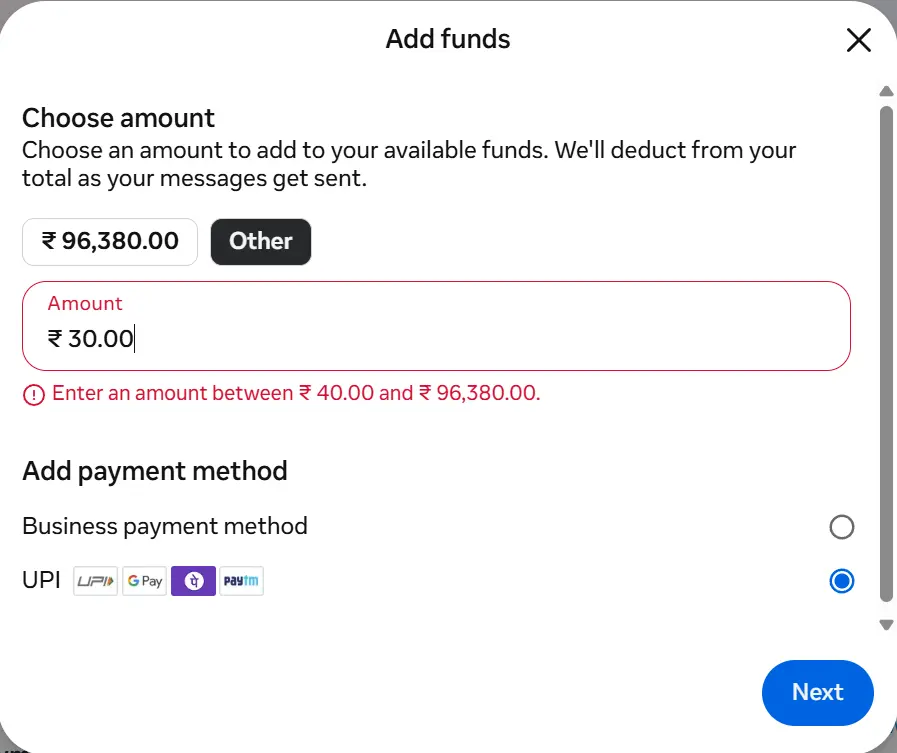
Inside the Billing Hub, the Add Funds flow lets you choose an amount and pay through a UPI app. The checkout step generates a QR code and lists supported apps, which for most Indian businesses include:
| UPI app | Supported in Billing Hub |
|---|---|
| PhonePe | Yes |
| Google Pay | Yes |
| Paytm | Yes |
| BHIM | Yes |
Payment requests carry an expiry time, so the QR code needs to be scanned and completed within that window or the request has to be regenerated. Several businesses, including our own account, have been able to add funds in increments as small as ₹40, which is a meaningfully lower barrier than the lump sum prepayments WhatsApp Business API billing used to require.
3. Monitoring wallet balance and payment history
The Billing Hub also tracks outstanding balance and recent payment activity, so you can see at a glance whether your account is funded enough to keep sending service and utility messages for the next billing cycle.
What happens if you do not add a payment method
If your WhatsApp Business Account has no active payment method after the September 30, 2026 deadline, or if your wallet balance hits zero and no backup payment method is attached, service message replies stop going out. Customers can still send you messages and those stay free, but your replies will not be delivered until funds are added. For a business running appointment confirmations, order updates, or payment reminders through WhatsApp, that is effectively a communication outage, not just a billing inconvenience.
This is also where the free allowance matters. The 1,000 free service messages reset monthly and do not roll over, so a business that runs a high volume campaign early in the month can exhaust its free tier well before the end of the billing cycle.
For the full rate card, including per message costs by market, see our detailed WhatsApp service message pricing breakdown. The short version is below.
| Message category | Before October 1, 2026 | After October 1, 2026 |
|---|---|---|
| Service messages (first 1,000 per number per month) | Free | Free |
| Service messages (beyond 1,000 per number per month) | Free | Billed per market rate |
| Utility templates inside the 24 hour window | Free | Billed |
| Utility templates outside the 24 hour window | Billed | Billed, unchanged |
| Marketing templates | Billed | Billed, unchanged |
| Authentication templates | Billed | Billed, unchanged |
| Entry point via Click to WhatsApp (first 72 hours) | Free | Free, unchanged |
What this means for small businesses running appointments and invoicing on WhatsApp
For service businesses, clinics, salons, and anyone using WhatsApp to confirm bookings or collect payments, utility templates are usually the backbone of the workflow: the confirmation after a booking, the reminder before an appointment, the receipt after a payment. Those are exactly the messages that just moved from mostly free to fully billed. If you are running bookings through a tool like our own WhatsApp Appointment Booking feature, those automated confirmation and reminder messages fall squarely into the utility template category this update affects, so it is worth checking your expected monthly volume against the new rates. The practical takeaway is not that WhatsApp automation stops making sense, the open rate and speed advantages over email and SMS have not gone anywhere, but that budgeting for it needs to be deliberate rather than assumed. Keeping the wallet funded, watching the free service message allowance, and knowing your utility template volume are now part of running WhatsApp as a channel, not an afterthought.
Frequently asked questions
What is a WhatsApp Business API wallet payment method?
It is the prepaid balance inside Meta’s Billing Hub that funds your WhatsApp Business Account’s messaging costs. You add money to it, typically through UPI in India, and Meta deducts charges from it as billable messages are sent.
What is the minimum amount I can add to the WhatsApp Business wallet?
Meta does not publish a single fixed minimum across all accounts, but many businesses, including ours, have successfully added funds through UPI in amounts as low as ₹40.
Do I need a GST number to use WhatsApp Business API?
Some accounts are now prompted to submit a GST number as part of tax verification in the Billing Hub before they can add funds. This is presented as a compliance requirement tied to local tax regulations rather than an optional step, so check your own Billing Hub for this prompt before assuming it does not apply to you.
What happens if my WhatsApp wallet balance reaches zero?
Outgoing service message replies stop being delivered until the wallet is topped up or another valid payment method takes over. Incoming customer messages are unaffected.
Are marketing and authentication messages affected by this change?
No. Those categories were already billed before October 1, 2026, and their pricing is unchanged. The new rules specifically affect service messages beyond the free allowance and utility templates sent inside the 24 hour window.
Is UPI the only way to pay?
UPI is the most common option shown to Indian businesses inside the Billing Hub, but Meta also supports other payment methods depending on region and account setup. Check the payment methods section of your own WhatsApp Manager for what is available to your account.
How Happilee’s WhatsApp Business API platform helps with this change
Happilee is a WhatsApp Business API platform built for exactly this kind of operational shift. Alongside features like automated appointment booking and reminders, the platform surfaces your wallet balance and template usage in one dashboard, so you are not relying on memory to track whether a Meta Billing Hub top up is due before a campaign goes out. For businesses that would rather not log into WhatsApp Manager every few days to check on service message allowances and utility template spend, that visibility is the practical difference between this update being a minor bookkeeping task and an unexpected outage.
This article explains publicly documented billing changes to the WhatsApp Business Platform as of October 1, 2026. Payment methods, minimum top up amounts, and tax verification requirements can vary by account and region, and Meta’s own Business Help Center is the authoritative source for your specific account. This content is informational and is not tax or legal advice.