
WhatsApp Coexistence is an official Meta feature that lets one WhatsApp Business number run on the WhatsApp Business App and the WhatsApp Business (Cloud) API at the same time. You keep chatting from your phone while adding automation, broadcasts, chatbots, and a shared team inbox through a Meta Business Partner like Happilee — no new number, no lost history.
Key Findings
- Coexistence = App + API on one number, officially. Meta’s own documentation calls the feature “Onboard WhatsApp Business app users” and notes it “is sometimes referred to as ‘Coexistence’ in support channels and Partner documentation.” A business “can still send messages on a one-to-one basis using the WhatsApp Business app, and WhatsApp keeps messaging history between both apps in sync.” Meta
- It solves the old migration trap. Before Coexistence, moving a number to the API meant deregistering it from the Business App — losing chat history, groups, status, and calls, and forcing many SMBs to buy a second number. Coexistence removes that either/or choice.
- Launched May 6, 2025 as an update to Meta’s Embedded Signup flow (“On May 6, 2025, Meta rolled out a long-awaited update to its Embedded Signup process, introducing a powerful new option called WhatsApp Coexistence”), following a limited beta earlier in 2025. It has since rolled out to nearly all markets.
- Best fit is SMBs, not enterprises. BSP documentation mirroring Meta’s guidance is explicit: “Coexistence’s primary use case is to assist SMBs that have not previously onboarded to the WhatsApp Business Platform. Coexistence is not specifically designed for larger enterprises.” 360dialog
- Happilee, an official Meta Business Partner, supports Coexistence natively with an 11-step Embedded Signup onboarding, a 4–6 hour chat/contact sync, zero markup on Meta conversation charges, and a 14-day free trial.
What is WhatsApp Coexistence?
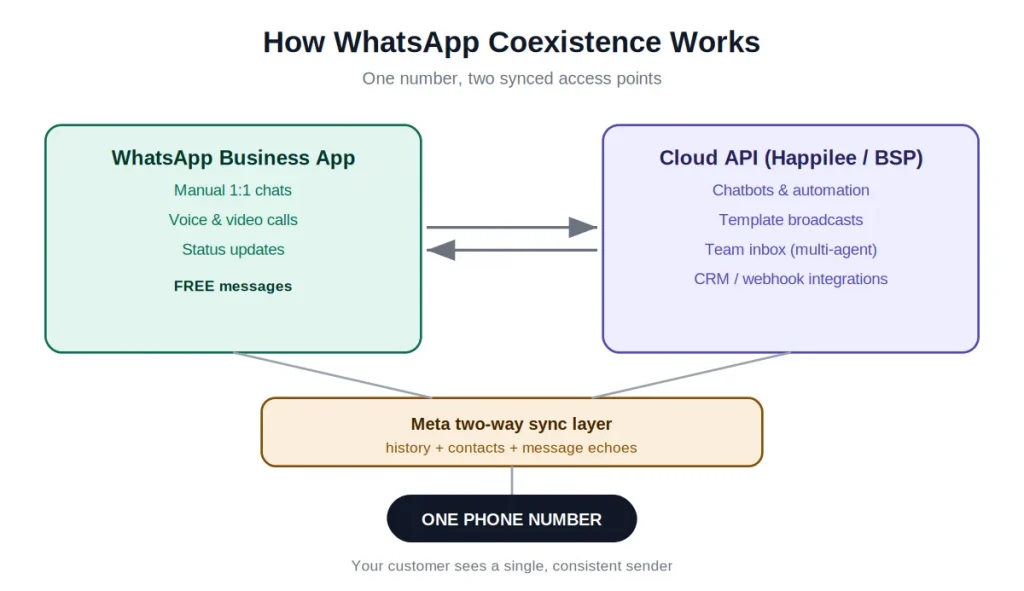
WhatsApp Coexistence (also called “Coexistence mode,” “Coex,” or by Meta’s formal name “Onboard WhatsApp Business app users” / “API Solutions for Business App Users”) is a Meta capability that lets one WhatsApp Business phone number operate simultaneously in two environments: the WhatsApp Business App on a phone, and the WhatsApp Business Platform (Cloud API) connected through a BSP or Tech Provider platform.
New messages sent or received on either side after Coexistence is enabled are mirrored to the other in real time through webhooks. If an agent replies from the phone app, it appears in the BSP or Tech Provider inbox (as an “echo” message); if the platform sends an automated notification or chatbot reply, the agent sees it in their phone chat thread. It is one conversation with two synchronized access points.
Technically, Coexistence runs on Meta’s standard Cloud API infrastructure plus three extra webhook subscriptions that create the two-way sync layer:
history— describes past messages the business sent/received (up to 180 days)smb_app_state_sync— describes the business’s current and new contactssmb_message_echoes— mirrors new messages the business sends from the Business App after onboarding
How It Works
How Coexistence differs from traditional API migration
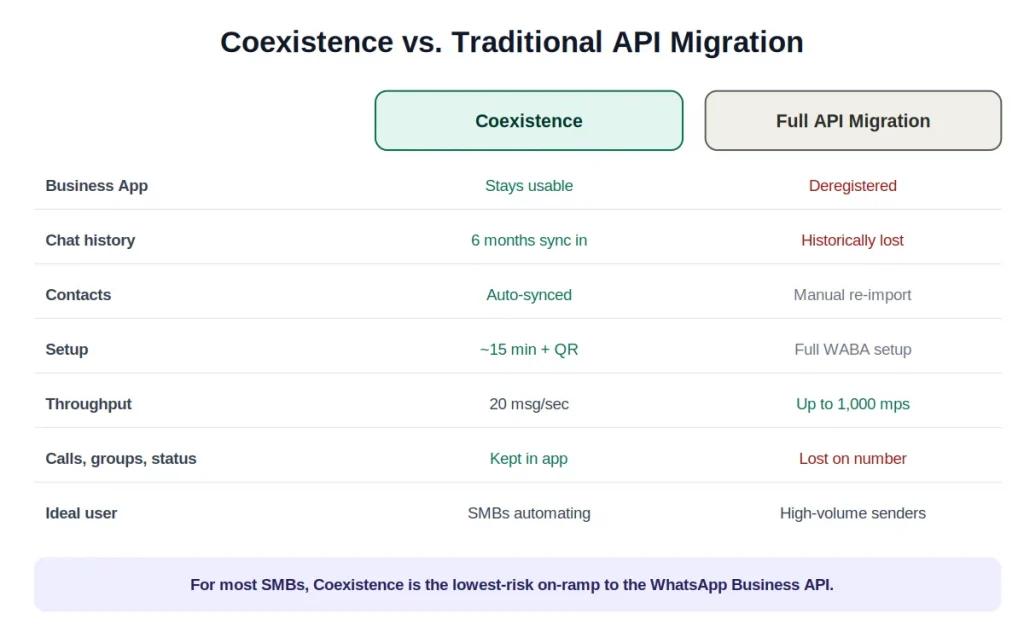
| Dimension | Coexistence mode | Traditional / full API migration |
|---|---|---|
| WhatsApp Business App on the number | Stays fully usable (manual chats, calls, status) | Number is deregistered from the app; app can no longer use it |
| Chat history | Up to 6 months (180 days) of 1:1 chats sync into the platform | Historically lost at cutover |
| Contacts | Synced automatically | Manually re-imported |
| Setup | Embedded Signup + QR scan, ~15 minutes | Full WABA creation + number registration |
| Throughput | Fixed 20 messages/second | 80 mps default, up to 1,000 mps by upgrade |
| Voice/video calls, groups, status | Kept in the app (not synced to API) | Lost on the number |
| Ideal user | SMBs already on the Business App wanting automation without disruption | High-volume senders needing maximum throughput and full API control |
| Reversibility | Disconnect from app settings; app keeps working | Number committed to API |
Not sure which path fits? Our guide on choosing between the WhatsApp Business App and the API breaks down the trade-offs in more detail.
Coexistence vs. Business App alone vs. full Cloud API
| Capability | Business App only | Coexistence (App + API) | Full Cloud API only |
|---|---|---|---|
| Manual 1:1 chat from phone | Yes | Yes | No (dashboard only) |
| Voice & video calls | Yes | Yes (app side) | No |
| Automation / chatbots | No | Yes (API side) | Yes |
| Template broadcasts (no 256 cap) | No (broadcast lists ≤256) | Yes | Yes |
| Multi-agent team inbox | Single user | Yes (API side) | Yes |
| CRM / webhook integrations | No | Yes | Yes |
| Max throughput | n/a | 20 mps | Up to 1,000 mps |
| Keep existing number & history | Yes | Yes | Number kept, history historically lost |
How chat history and contacts sync
At onboarding the business is asked whether to share history. If they agree, Meta sends the last 180 days of 1:1 messages in three phases: “phase 0: day 0 through day 1; phase 1: day 1 through day 90; phase 2: day 90 through day 180.” Key rules:
- Group chats are never included.
- Media messages only include downloadable media asset IDs if sent within 14 days of onboarding; older media appears as placeholders.
- The import runs once — there is no continuous backfill of old messages. From the moment Coexistence is live, new messages sync going forward.
- The history choice is effectively irreversible without disconnecting and reconnecting the number from scratch.
Meta gives the partner a 24-hour window to complete synchronization after onboarding, or the business must be offboarded and redo the flow. On Happilee specifically, the chat and contact sync “usually takes around 4 to 6 hours to complete,” after which past chats appear under the Team Inbox tab and contacts under the Contacts tab. Happilee
Eligibility and requirements checklist
- WhatsApp Business App version 2.24.17 or higher (not the personal WhatsApp app). facebookBytepaper
- The number must already be active on the WhatsApp Business App with genuine recent activity — Meta assesses account tenure and messaging quality. New/idle numbers may be rejected. 360dialog
- Onboarding through an official BSP / Tech Provider via Embedded Signup with session logging. facebook
- A Meta Business portfolio; the number added to Meta Business Manager.
- The number must NOT currently be connected to another BSP/API. If it was recently disconnected from the API, plan a 1–2 month cooldown of active app use before re-onboarding.
- Supported country/region (see limitations).
- Open the WhatsApp Business App at least once every ~14 days to keep the connection alive. Meta’s
account_updatewebhook lists the disconnect reasonPRIMARY_INACTIVITYas “primary device inactive for approximately 14 days” (companion-device inactivity triggers disconnect after approximately 30 days).
How to enable WhatsApp Coexistence (step by step)
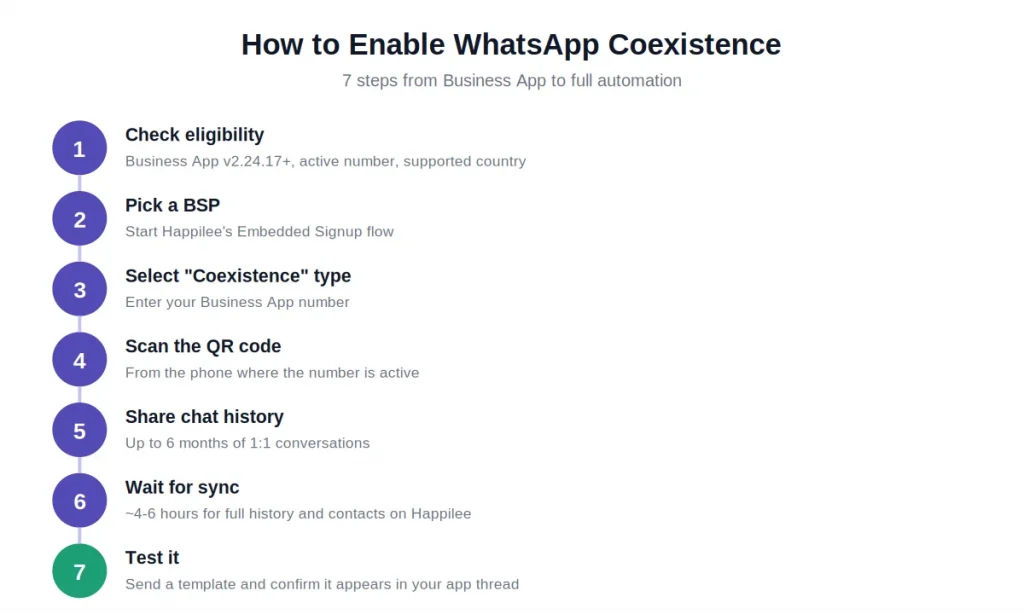
- Confirm eligibility: Business App on v2.24.17+, active number, verified/verifiable business, supported country.
- Choose a BSP or Tech Provider that supports Coexistence (e.g., Happilee) and start its Embedded Signup flow.
- In the flow, select the “Connect a WhatsApp Business App” / “Coexistence” onboarding type (on Happilee this is the “Select Onboarding Type” step).
- Enter the WhatsApp Business App phone number with country code.
- A message arrives from the official Facebook Business account; tap Connect / scan the QR code from the same phone where the number is active. HighLevel
- Confirm permissions and choose whether to share up to 6 months of chat history.
- Wait for sync (minutes for Meta’s handshake; ~4–6 hours for full history/contacts on Happilee). Keep the app open and online.
- Test: send a template from the platform and confirm it appears in the app thread, and vice versa.
New to sending automated messages? Start with our primer on WhatsApp message templates before you launch your first broadcast.
Messaging limits, throughput, and pricing implications
- Throughput: A coexistence number is fixed at 20 messages per second. Meta’s developer documentation states verbatim: “To remain compatible with the WhatsApp Business app, business phone numbers that are in use with both the WhatsApp Business app and Cloud API have a fixed throughput of 20 mps” (vs. 80 mps default for API-only). That is roughly 1,200 messages/minute or 72,000/hour if sustained — well beyond typical SMB needs. Exceeding it returns error 130429, and it cannot be upgraded while Coexistence is active.
- Messaging (volume) tiers: Coexistence follows standard Cloud API tiers. New business portfolios start at Tier 0 = 250 unique business-initiated conversations per 24 hours, scaling to 1,000 → 10,000 → 100,000 → unlimited based on quality rating and usage. Notably, Coexistence numbers can climb past 250 based on quality and volume without mandatory business verification — useful for smaller businesses not yet Meta-verified. Meta now reviews tier upgrades roughly every 6 hours.
- Pricing split: Messages sent from the WhatsApp Business App remain free and do NOT count toward API limits or trust tiering. Messages sent via the Cloud API are billed under Meta’s conversation-based pricing by category (marketing, utility, authentication; service conversations are free) and country. The 24-hour customer service window applies only to API-sent messages; app messages don’t create, extend, or affect API windows or pricing. Happilee adds zero markup on Meta’s conversation charges. Happilee
Limitations and known constraints
- Fixed 20 mps throughput — a ceiling for very large, time-sensitive bursts.
- Features disabled on the number after onboarding: message edit/revoke, disappearing messages, view-once, live location; broadcast lists become read-only.
- Not supported/synced to API: group chats (stay app-only), voice/video calls, business tools (catalog, orders, status), messaging tools (greeting/away messages, quick replies, labels), business profile edits, Channels.
- Companion devices are unlinked at onboarding; WhatsApp Web and macOS can be re-linked, but WhatsApp for Windows and WearOS are not supported.
- No Official Business Account (green/blue tick) via Coexistence — the OBA badge assumes a pure API number and doesn’t transfer; Standard Business Verification isn’t available either. Meta Verified for Business (or Partner-Led Business Verification) is the alternative, and can restore the display name in the chat header.
- Not compatible with the Marketing Messages Lite API. Bytepaper
- One number at a time per BSP; switching providers needs offboarding first (and a credit-line caveat — Coexistence credit lines can’t be migrated to another provider).
- Country availability: rolled out to nearly all markets by mid-2026 (US, UK, all 27 EU states, India, etc.). The most commonly cited remaining exclusions have been Nigeria and South Africa, though Meta expands in waves and doesn’t publish one fixed list — eligibility is confirmed per number during Embedded Signup. Separately, sanctioned country codes (Cuba, Iran, North Korea, Syria, and Crimea/Donetsk/Luhansk) are unsupported for WABA entirely. gohighlevel
Benefits and use cases for SMBs
Coexistence matters most for the huge base of businesses already on the WhatsApp Business App. Meta’s most recent official figure is 200 million monthly active users of the standalone Business App, reported in June 2023 (up 4x from 50 million in July 2020) — a base concentrated among micro/small businesses, solopreneurs, and local shops, especially in India, Brazil, and Southeast Asia. Note this is a monthly-active-users figure, not a confirmed count of distinct businesses. Typical SMB use cases:
- Retail / D2C: API sends order confirmations, shipping updates, and abandoned-cart nudges; staff answer product questions manually from the app.
- Clinics, salons, tutors, fitness studios: API automates appointment reminders and reduces no-shows; staff handle reschedules personally from the phone.
- Real estate / consultative sales: automation routes leads to the right agent, who closes personally via the app on the same number.
- Field teams: reps keep the app on their phones for on-the-go chats while the office team runs campaigns and a team inbox through the API.
The through-line: automation handles repetitive volume, humans keep the personal touch, and — because app replies are free — the business keeps human conversations off the API meter while still getting reporting and CRM logging.
Many of these journeys start from a Click-to-WhatsApp ad that drops a lead straight into your inbox.
Where Happilee fits
Happilee is an official Meta Business Partner and WhatsApp Business API platform, strongest with SMBs in India and the GCC, that supports WhatsApp Coexistence natively. Businesses can connect an existing Business App number through Happilee’s Embedded Signup flow (the “Select Onboarding Type” step), keep chatting from the phone, and layer on Happilee’s no-code chatbot builder, broadcasts, team inbox, WhatsApp commerce, appointment booking, and Click-to-WhatsApp ads on the same number.
Happilee’s differentiators for cost-conscious SMBs are transparent INR/AED/USD pricing, zero markup on Meta conversation charges, a 14-day free trial with no credit card, and multilingual support (English, Hindi, Malayalam, Tamil). Published plans are a quarterly-only Basic, Growth at ₹1,799/month (5 users, 15,000 conversations, up to 10 chatbots), Advanced at ₹3,499/month (10 users, 35,000 conversations, up to 20 chatbots), and Enterprise on request, with additional users at ₹699/month and 20% off on annual billing. As a proof point, Happilee’s featured customer Power Vision TV (media & broadcasting) used WhatsApp OTP, Facebook lead integration, and bulk broadcasts to improve inquiry-to-customer conversion and lead quality on the platform.
Frequently Asked Questions About WhatsApp Coexistence
1. What is WhatsApp Coexistence?
It’s an official Meta feature that lets one WhatsApp Business number run on the WhatsApp Business App and the WhatsApp Business (Cloud) API at the same time — manual chats on the phone, automation and broadcasts through the API, all synchronized.
2. Will I lose my chat history or contacts?
No. Up to six months (180 days) of 1:1 chat history and your contacts sync into the BSP platform at onboarding. Group chats and messages older than 180 days are not synced.
3. Can I still use the WhatsApp Business App after connecting?
Yes — that’s the entire point. The app stays fully usable for manual replies, calls, and status. Only broadcast lists (read-only), disappearing/view-once/live-location messages, and message edit/revoke change.
4. How is Coexistence different from the full WhatsApp Business API?
Full API migration hands the number entirely to the Cloud API — the phone app can no longer use it, and throughput can scale to hundreds of messages per second. Coexistence keeps the app alive on the same number but caps throughput at 20 mps and disables a few app features. The API capabilities themselves (templates, automation, broadcasts, integrations) are identical.
5. Is there a message limit under Coexistence?
Throughput is fixed at 20 messages/second. Volume is tiered like any Cloud API number: new portfolios start at 250 business-initiated conversations per 24 hours and scale up based on quality and usage — and you can grow past 250 without mandatory business verification.
6. Does it cost extra? What’s billed?
Messages sent from the Business App stay free. Messages sent via the Cloud API are billed under Meta’s conversation-based pricing (marketing/utility/authentication; service is free). A quality BSP like Happilee adds no markup on Meta’s charges — you pay Meta’s rate plus the platform subscription.
7. Can I get the blue tick (Official Business Account) on a Coexistence number?
No. The OBA badge doesn’t transfer to Coexistence numbers. Use Meta Verified for Business instead, which can also restore your display name in the chat header.
8. Which countries support Coexistence?
Nearly all as of mid-2026 — US, UK, EU, India, GCC and more. Nigeria and South Africa have been the most commonly cited exceptions, but Meta expands in waves and confirms eligibility per number during Embedded Signup.
9. How long does setup take?
The Embedded Signup handshake takes about 15 minutes; full history and contact sync takes roughly 4–6 hours on Happilee, depending on how much history and how many contacts you have.
10. Can I disconnect later?
Yes. From the WhatsApp Business App go to Settings → Account → Business Platform → Disconnect Account. The app keeps working on the number afterward.
Recommendations
- If you’re an SMB already running the WhatsApp Business App and want automation without disruption — choose Coexistence. It’s the lowest-risk on-ramp: keep the number customers already saved, sync six months of history, and add a chatbot + team inbox. Start with a BSP or Tech Provider that supports it (e.g., Happilee’s 14-day free trial) and run one real broadcast + one chatbot flow before committing.
- Before you flip the switch, do a dependency audit. If your operations rely on broadcast lists, WhatsApp groups, disappearing/view-once messages, or a Windows desktop app, map replacements first (template campaigns for broadcasts; labels → contact attributes; Web/macOS for desktop).
- Protect continuity: back up chats, complete the history sync in one uninterrupted session (keep the app open), and reopen the Business App at least every 14 days to avoid disconnection.
- Plan your verification path: you don’t need Standard Business Verification to grow past 250 conversations/day, but if you want your display name and a verified badge, budget for Meta Verified for Business.
- Choose Coexistence vs. full API by throughput and burst needs. If you routinely send urgent, time-critical blasts to tens of thousands of contacts within minutes, the 20 mps cap will bite — go full Cloud API (or add a second API-only number). Benchmarks that should change the decision: sustained demand approaching ~20 mps, or a hard completion window under ~10 minutes for large sends.
- Optimize cost: start conversations that can be free (let customers message first to open a service window), keep human replies in the free app channel, and reserve paid API templates for automation and scale.
Conclusion
WhatsApp Coexistence closes the biggest gap SMBs faced for years: the choice between the familiar Business App and the power of the API. Now you get both on a single number — keep your contacts, your chat history, and your free one-to-one conversations, while layering on chatbots, broadcasts, and a shared team inbox.
For most small and mid-sized businesses, Coexistence is the lowest-risk on-ramp to the WhatsApp Business API. Reserve a full API migration for the rare case where you routinely send tens of thousands of time-critical messages within minutes and the 20 mps cap would hold you back. For everyone else, Coexistence is the smart middle path.
Ready to run the Business App and API on the same number? Start your free 14-day trial with Happilee and connect your existing number in about 15 minutes.