
Meta Business Agent is a free AI assistant built into the WhatsApp Business app that replies to customers, shares product recommendations, and books simple appointments without any coding. It launched globally on June 3, 2026. The self serve version only works inside the WhatsApp Business app, not on the WhatsApp Business API, and it cannot send broadcasts, connect to a CRM, or route chats across a team. Businesses that need shared inboxes, campaign sending, or system integrations still need a WhatsApp Business API platform such as Happilee. We have supported WhatsApp Business API accounts long enough to watch this exact pattern repeat: Meta’s in app tools are genuinely useful for a solo operator, and genuinely limiting the moment a business adds a second team member.
What Meta Business Agent actually is
Meta Business Agent is Meta’s native AI assistant for the WhatsApp Business app, Facebook Messenger, and Instagram. Meta announced it at its Conversations conference and rolled it out globally on June 3, 2026, after roughly two years of limited testing in markets including India and Mexico.
The pitch is simple. Instead of hiring someone to answer every incoming WhatsApp message, a small business trains the agent on its past chats, its website, and its product catalog, then lets it reply automatically around the clock.
There are three distinct products under this umbrella, and mixing them up is where most confusion starts.
| Product | Who it is for | Cost |
| WhatsApp Self Serve Business Agent | Solo operators and very small businesses using the WhatsApp Business app | Free |
| Messenger Self Serve Business Agent | Small businesses running their page through Messenger | Free |
| Meta Business Agent Platform | Larger, invite only enterprise accounts | Token based, final pricing not yet published |
This guide focuses on the version most small and mid sized businesses in India will actually encounter: the free, self serve agent inside the WhatsApp Business app.
How Meta Business Agent works inside the WhatsApp Business app
Setup is genuinely quick, and Meta has made a point of keeping it code free. In practice it comes down to three steps.
- Open the Tools menu inside the WhatsApp Business app and select Meta Business Agent.
- Let it learn from your past conversation history, your website, and your product catalog. Meta states this training step takes around fifteen minutes.
- Test the agent’s replies, then turn on the controls that matter to you before switching it fully live.
Once it is running, a business keeps control through four settings.
- Knowledge: what the agent is allowed to learn from, including catalog items and website content.
- Personality: the tone it replies in, so responses sound like the business rather than a generic bot.
- Audience: which customers or chats the agent is allowed to respond to.
- Handoff rules: when a conversation gets routed to a human instead of being answered by the agent.
What Meta Business Agent can actually do
Within the WhatsApp Business app, the agent covers a genuinely useful slice of day to day customer conversation.
- Answers repetitive questions instantly, any time of day, without a person on the other end.
- Shares product recommendations pulled from the business’s own catalog.
- Collects basic customer details, such as what someone is looking for or how to reach them.
- Handles simple appointment style requests for service businesses.
- Hands a conversation off to a human staff member when it recognizes it should not continue on its own.
Meta has cited early results such as one small business handling roughly 60 percent of inbound questions through the agent before a human ever joins the chat. For a one person operation, that is a meaningful amount of time back.
What Meta Business Agent cannot do, and why most guides skip this part
This is the section competitor coverage of Meta Business Agent tends to gloss over, and it is the part that actually decides whether this tool fits your business.
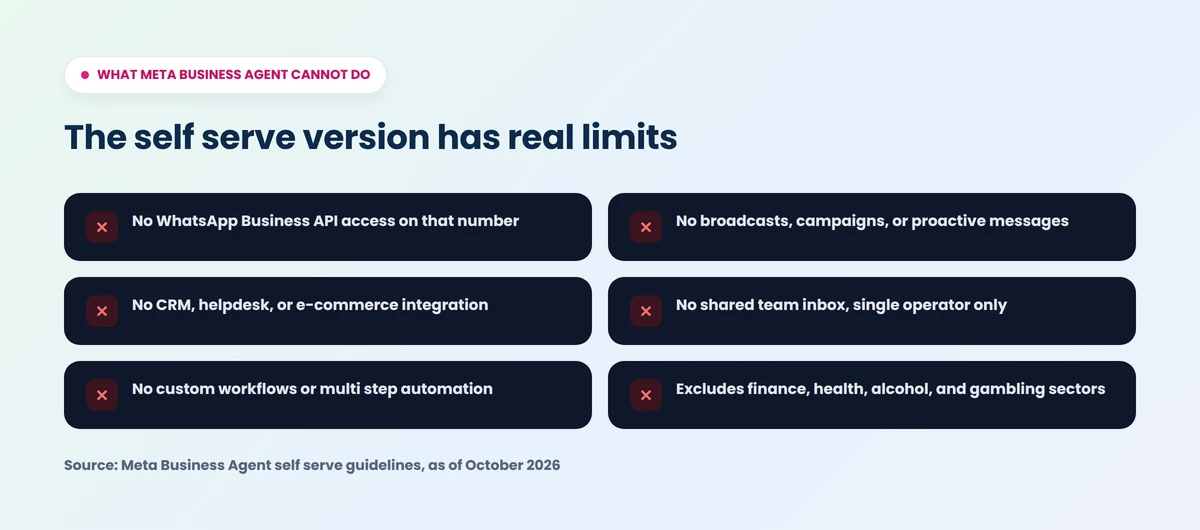
It only works inside the WhatsApp Business app, not the WhatsApp Business API. The self serve agent has no API access. If your business already runs on the WhatsApp Business API through a provider, this free agent is simply not available to you on that number, and it was never built to be.
It cannot send broadcasts or campaigns. The agent only replies to messages customers send first. It will never start a conversation, send a promotional blast, or deliver an appointment reminder on its own. Everything it does is reactive.
It does not connect to a CRM, helpdesk, or e-commerce backend. There is no native integration path to tools like a sales CRM, a support ticketing system, or platforms such as Shopify beyond your own product catalog inside WhatsApp itself.
It cannot build custom workflows. There is no way to define multi step automation, trigger actions in another system, or branch a conversation based on business logic beyond the agent’s own training.
It only routes to a single operator. There is no shared team inbox, no assignment rules, and no way to split incoming chats across multiple staff members with visibility for everyone.
Eligibility is restricted. Access requires business verification and an eligible location, and Meta excludes certain sectors from parts of this program, including finance, government, healthcare, alcohol, and gambling related businesses.
If your business is a single person replying to WhatsApp messages between other tasks, none of this matters much. If you already have more than one person touching customer chats, each of these gaps becomes a daily friction point.
What Meta Business Agent costs today
The self serve version inside the WhatsApp Business app is free, with no published end date for that pricing. The enterprise Meta Business Agent Platform, by contrast, is invite only and will bill on a token basis tied to usage, though Meta has not yet published final rates for that tier. Businesses evaluating this tool today should plan around the free self serve version and treat the enterprise platform as a separate, still maturing product rather than something generally available.
Meta Business Agent vs WhatsApp Business API: the comparison most guides avoid
This is the question that actually matters once a business starts growing: should you stay inside the free, built in agent, or move to a WhatsApp Business API platform.
| What you need | Meta Business Agent (self serve) | WhatsApp Business API |
| Cost | Free | Usage based conversation pricing plus a platform fee |
| Works inside the WhatsApp Business app | Yes | No, separate infrastructure entirely |
| CRM or helpdesk integration | No | Yes |
| Shared team inbox with routing | No, single operator only | Yes |
| Broadcasts and campaign sending | No | Yes |
| Appointment reminders and proactive messages | No | Yes |
| Custom automation and workflows | No | Yes |
| Multi channel support | Instagram and Messenger only | Yes, typically omnichannel through a provider |
| Setup effort | Minutes, no coding | Requires a WhatsApp Business Solution Provider or direct Meta onboarding |
| Best fit | Solo operators, very small businesses | Growing teams, appointment based businesses, e-commerce, anyone sending proactive messages |
The core distinction is this: Meta Business Agent is a single operator convenience feature built on top of WhatsApp. The WhatsApp Business API is the underlying messaging infrastructure that lets an entire business, not one phone, run on WhatsApp.
For a deeper, feature by feature breakdown of this exact comparison, including pricing structures and migration considerations, see our full Meta Business Agent vs WhatsApp Business API guide.
Who should actually use Meta Business Agent, and who has already outgrown it
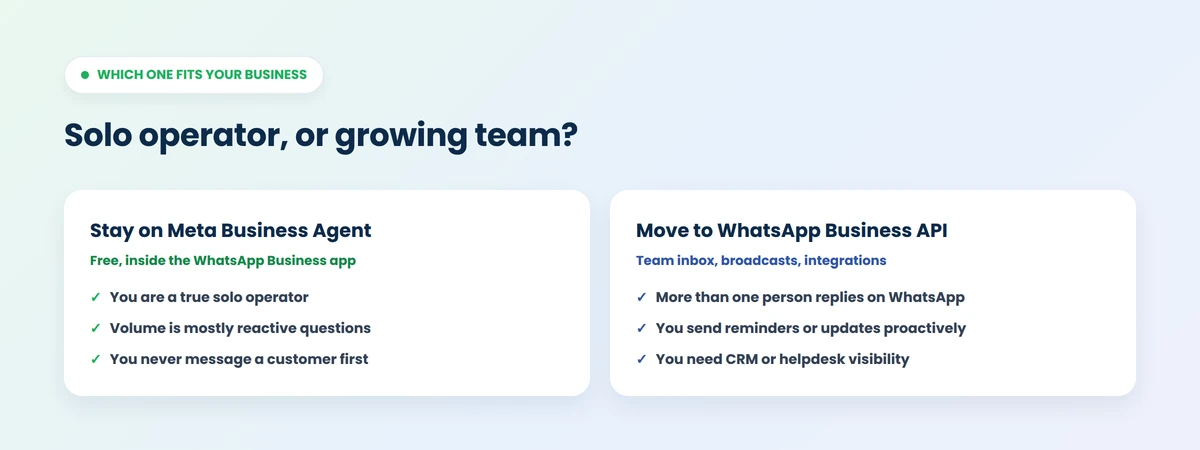
Meta Business Agent is a strong fit if you are a true solo operator, your WhatsApp volume is mostly reactive customer questions, and you never need to message a customer first outside an active conversation.
It is the wrong tool the moment any of the following is true for your business:
- More than one person needs to see or reply to WhatsApp conversations.
- You need to send appointment reminders, order updates, or shipping confirmations proactively.
- You want WhatsApp conversations visible inside your CRM or helpdesk.
- You run promotions, re-engagement campaigns, or abandoned cart nudges over WhatsApp.
- Your business falls into a sector Meta currently excludes from parts of this program.
We have watched this exact handoff happen repeatedly with businesses that start on free, built in tools and outgrow them within a few months of real customer volume. The free agent is rarely the wrong first step. It is often the wrong place to stay.
How Happilee’s WhatsApp Business API platform fills the gap
Happilee is an official Meta Tech Partner built specifically for businesses that have outgrown single operator tools like the self serve Business Agent. Where Meta’s free agent stops, a WhatsApp Business API platform like Happilee picks up: a shared team inbox so more than one person can work the same WhatsApp number, proactive messaging for things like appointment booking and reminders, and clear, predictable billing so you know exactly what a message costs, including the service message pricing most businesses ask about first.
If you are also trying to make sense of Meta’s October 1, 2026 changes to WhatsApp Business API billing and the new wallet payment requirement, we broke that down in detail in our WhatsApp Business API wallet and payment method guide.
Frequently asked questions
What is Meta Business Agent on WhatsApp?
It is a free AI assistant built into the WhatsApp Business app that automatically replies to customer messages, recommends products from your catalog, and can hand off to a human team member when needed.
Is Meta Business Agent free?
Yes, the self serve version inside the WhatsApp Business app is free with no announced end date. A separate, invite only enterprise platform will use token based pricing that Meta has not yet finalized.
Does Meta Business Agent work with the WhatsApp Business API?
No. The self serve agent only works inside the WhatsApp Business app. It has no API access, so businesses running on the WhatsApp Business API will not find this feature on that number.
Can Meta Business Agent send broadcast messages or reminders?
No. It only replies to messages a customer sends first. It cannot start a conversation, send a promotional broadcast, or deliver a proactive appointment reminder on its own.
Can I connect Meta Business Agent to my CRM or Shopify store?
Not directly. It only draws on your WhatsApp chat history, your website, and your product catalog inside WhatsApp itself. There is no native CRM, helpdesk, or e-commerce platform integration.
What happens when a business outgrows Meta Business Agent?
The usual next step is a WhatsApp Business API platform, which adds a shared team inbox, broadcast and campaign sending, CRM integration, and custom automation that the free, single operator agent was never designed to provide.
Is Meta Business Agent available to every type of business?
No. It requires business verification and an eligible location, and Meta currently excludes certain sectors, including finance, government, healthcare, alcohol, and gambling related businesses, from parts of the program.
How is Meta Business Agent different from the general Meta AI assistant?
Meta Business Agent is trained specifically on your business data to represent your business in customer conversations. The general Meta AI assistant is a consumer facing tool and is not trained on or tied to any specific business’s catalog or chat history.