
If you’ve ever messaged a bank, airline, or major retailer on WhatsApp and noticed a small blue checkmark next to their name, you’ve seen an OBA in action. That single badge tells a customer, in an instant, that they’re talking to the real business — not an impersonator running a lookalike number.
For any company using WhatsApp as a customer engagement channel, understanding what an OBA is (and whether your business can qualify) is one of the most practical trust decisions you’ll make this year. It affects how customers perceive your brand, whether you show up in WhatsApp search results, and how confidently people click “reply” on a marketing or support message.
At happilee, we work with growing businesses building out their WhatsApp Business Platform presence, and OBA status is consistently one of the first questions teams ask once their messaging volume starts to scale.
This guide breaks down exactly what an OBA is, how it differs from a regular WhatsApp Business account and from the paid Meta Verified subscription, the eligibility requirements, the step-by-step application process, and what’s changed in the WhatsApp Business Platform through 2025 and into 2026 — including pricing shifts that affect how much OBA-level messaging actually costs.
1. What Is an OBA (Official Business Account)?
According to Meta’s own developer documentation, an OBA is “a business phone number owned by a business that has been verified as an authentic brand according to specific criteria.” Numbers with OBA status display a blue checkmark beside their name in the WhatsApp contacts view.
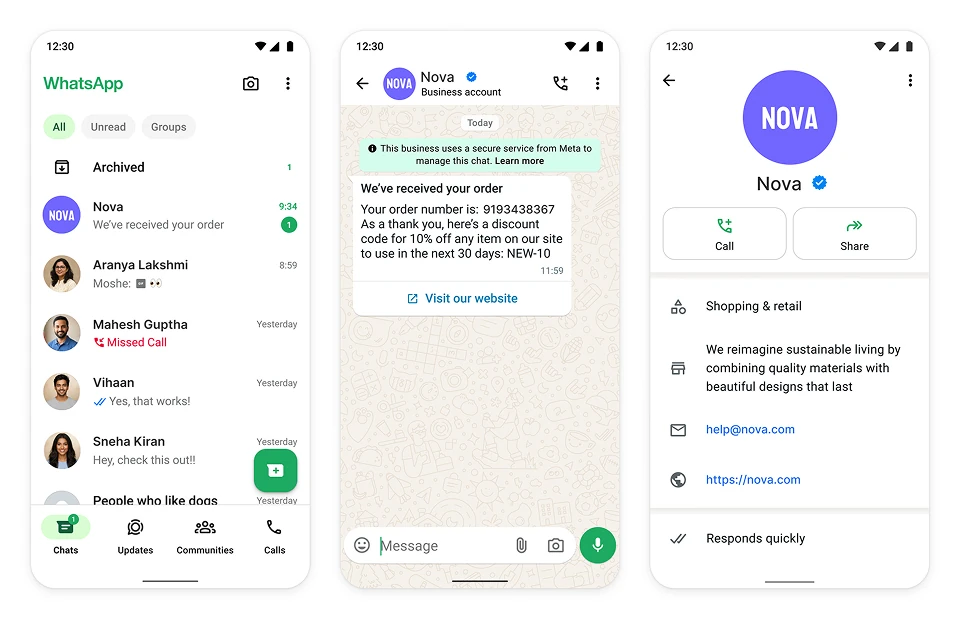
That’s the technical definition. In practice, an OBA solves a very specific trust problem: WhatsApp numbers, by default, are just phone numbers. Nothing stops a scammer from registering a WhatsApp Business number with your logo and company name. OBA status is Meta’s way of certifying “we checked — this is really them.”
Note that OBA status is a badge layered on top of the WhatsApp Business Platform (the API-based product used by larger companies), not a separate product. You still need a functioning WhatsApp Business Platform account before you can even apply.
2. OBA vs. Regular WhatsApp Business Account vs. Meta Verified
It’s easy to confuse three different things that all involve WhatsApp and “verification.” Here’s how they actually differ:
| Account Type | Cost | How You Get It | What Customers See |
|---|---|---|---|
| Regular WhatsApp Business Account | Free | Default status for any WhatsApp Business App or Platform number | Gray “Business Account” label; phone number shown unless saved |
| OBA (Official Business Account) | Free | Merit-based application after verification + notability review | Brand name shown to everyone, blue checkmark, appears in WhatsApp search |
| Meta Verified for Business | Paid subscription ($14.99–$349.99/month, approx. ₹1,300–₹30,400/month by tier) | Subscribe directly, no notability bar | Same blue checkmark, plus extras like a discoverable web page and impersonation protection |
The badge itself looks identical whether you earned it through the free OBA route or the paid Meta Verified subscription. The difference is entirely in how you qualify. A well-known airline with national press coverage will likely go the free OBA route. A growing regional business that hasn’t built up organic media coverage yet may find the paid Meta Verified subscription a faster path to the same badge.
One point worth repeating because it surprises a lot of teams: neither path changes what your WhatsApp API can actually do. Templates, broadcasts, catalogs, and Flows behave exactly the same with or without the badge. OBA is a trust and visibility feature, not a functionality upgrade.
3. Eligibility Criteria for OBA Status
Per Meta’s official developer documentation, to be eligible for OBA your business must:
- Comply with the WhatsApp Business Messaging Policy
- Be active on the WhatsApp Business Platform for at least 30 days
- Represent “a well-known and frequently searched for business, brand, or entity”
- Have completed Meta Business Verification for the owning business portfolio
- Have two-step verification enabled on the business phone number
- Have an approved display name that matches your registered business identity
Meta explicitly excludes employee accounts, test numbers, and WhatsApp Business App numbers (the free consumer-facing app, as opposed to the API) from OBA eligibility.
The hardest requirement by far is the notability bar. In practice, this typically means having roughly three to five pieces of genuine, unpaid media coverage — articles from reputable outlets that mention your business by its exact registered name. Sponsored content, press releases you’ve distributed yourself, and paid placements generally don’t count toward this bar.
4. How to Apply for an OBA (Step-by-Step)
- Complete Meta Business Verification in Business Manager’s Security Center. You’ll submit legal documentation — certificate of incorporation, business license, tax ID, or equivalent — that must match your registered details exactly. Meta states this review can take anywhere from about 10 minutes to 14 working days.
- Get your display name approved. This is triggered automatically once verification completes and typically resolves within a day or two.
- Enable two-step verification on your WhatsApp Business Platform number.
- Build your notability case before applying — gather links to genuine media coverage naming your business.
- Submit the OBA request, either through WhatsApp Manager (Phone numbers > Profile > Official Business Account > Submit Request) or via the API endpoint for official business account requests.
- Wait for review. Meta doesn’t publish a fixed timeline for OBA decisions. A successful API submission only confirms the request was received — not that it’s approved.
- If denied, there’s currently no appeal process; you’ll need to wait 30 days before reapplying, ideally after strengthening your notability evidence or fixing a display-name mismatch.
5. Benefits of Holding an OBA
- Brand name always visible — even to people who’ve never saved your number, which matters enormously for cold outreach, support replies, and marketing clicks.
- Discoverability in WhatsApp’s in-app search. Non-OBA numbers simply don’t appear when someone searches for your brand inside WhatsApp.
- Higher perceived trustworthiness. In a Meta-commissioned survey across 44 countries, people were nearly twice as likely to say they trust that a business is genuinely who it claims to be when it carries the Meta-verified badge.
- Reduced impersonation risk, since customers learn to associate the checkmark with your brand specifically.
6. Where OBA Fits in the WhatsApp Business Platform
The WhatsApp Business Platform (what many still informally call the “WhatsApp Business API”) is the enterprise-grade product used by mid-size and large businesses, distinct from the free consumer WhatsApp Business App. Most companies access it through a Business Solution Provider (BSP) — partners like Twilio, 360dialog, Gupshup, Sinch, or Vonage — who provide the technical infrastructure and tooling, though Meta itself makes all verification and OBA decisions. See our guide to choosing a WhatsApp Business Solution Provider for a breakdown of how these partners compare on cost and features.
As of October 2025, Meta has also retired the On-Premises API, making Cloud API the only supported infrastructure path — a relevant detail if you’re mapping out your platform migration alongside an OBA application.
Newly onboarded business portfolios start with a messaging limit of 250 unique recipients per rolling 24-hour period. As you complete verification and maintain message quality, this scales up through 1,000, 10,000, 100,000, and eventually unlimited tiers. OBA status sits on top of this infrastructure as a trust layer — it doesn’t change which tier you’re on or how many messages you can send.
7. What’s Changed for OBA and WhatsApp Business in 2025–2026
A few structural shifts are worth knowing if you’re planning your WhatsApp strategy this year:
- Badge color unification: The historic green checkmark was replaced with the blue checkmark used across Facebook and Instagram, aligning WhatsApp’s verified-business visual language with the rest of Meta’s family of apps.
- Per-message pricing: WhatsApp Business Platform messaging shifted from conversation-based pricing to per-message pricing as of July 1, 2025, changing how costs are calculated for template sends.
- Free service conversations: Customer-service replies within the 24-hour window became free and unlimited as of November 1, 2024.
- US marketing restrictions: Marketing template messages to US (+1) numbers have been blocked since April 1, 2025, pushing many businesses toward utility and service-based messaging instead.
- On-Premises API sunset: Meta retired the On-Premises API on October 23, 2025, making Cloud API the only supported path for the platform going forward.
- AI-driven business conversations growing fast: Business AI conversation volume on the platform grew roughly tenfold in the first quarter of 2026 compared to the start of the year, signaling where WhatsApp is investing next.
None of these changes affect OBA eligibility criteria directly, but they do affect the cost and structure of the messaging you’ll be doing once you have the badge — worth factoring into your budget conversations.
8. Industries Best Suited for OBA Status
Because the notability requirement favors recognizable brands, OBA status tends to be most attainable — and most valuable — for:
- E-commerce and retail, using OBA-backed numbers for order confirmations, shipping updates, and cart-recovery messages
- Airlines and travel companies, sending boarding passes and itinerary changes
- Banks and financial services, where trust is mission-critical for OTPs and account alerts
- Telecom providers, handling billing and account management at scale
Smaller, locally known businesses without national press coverage will often find the paid Meta Verified subscription a more realistic route to the same blue checkmark. For a closer look at how retailers are using verified numbers for conversational selling, see how WhatsApp Commerce works for e-commerce businesses.
If you’re weighing which verification path fits your business stage, our comparison of Meta Verified vs. OBA walks through the decision in more depth.
9. Common Reasons OBA Applications Get Rejected
- Display name mismatch — the name shown on WhatsApp doesn’t exactly match your legally registered business name
- Insufficient notability evidence — too few (or too promotional) media mentions
- Incomplete Business Verification — missing or mismatched legal documentation
- Applying too early — before the 30-day minimum activity period on the platform
10. Is an OBA Free? Understanding the Real Costs
The OBA application itself costs nothing — Meta doesn’t charge a fee to review or grant the badge. What does cost money is the underlying WhatsApp Business Platform usage: per-message fees for marketing, utility, and authentication templates (service replies within the free window remain free), plus whatever your Business Solution Provider charges for hosting, tooling, or markup. If you go the Meta Verified route instead, that’s a separate monthly subscription starting at $14.99 (roughly ₹1,300) and scaling up to $349.99 (roughly ₹30,400) by tier.
India-specific messaging rates (2026, approximate INR equivalents): India happens to have among the lowest per-message rates globally on the WhatsApp Business Platform — marketing template messages run around $0.0094 per message, which works out to roughly ₹0.80 per message at current exchange rates. That compares to roughly ₹2.15 per message (~$0.025) for marketing sends to US numbers, and considerably higher rates in markets like Germany. Utility and authentication messages sent within the free 24-hour service window cost nothing regardless of country. Our WhatsApp Business API pricing breakdown covers the full country-by-country rate card and how BSP markups typically add on top.
(INR figures are approximate conversions for budgeting purposes only — always confirm current rates on Meta’s official pricing documentation, since both messaging rates and exchange rates shift periodically.)
Conclusion
An OBA is ultimately a trust signal, not a technical upgrade — but on a platform where over 3 billion people chat every month, trust signals are exactly what turn a message into a reply, and a reply into a sale. If your brand already has real public recognition, the free OBA route is worth pursuing methodically: get verified, build your notability case, and apply once your display name and documentation line up cleanly. If you’re earlier in that journey, Meta Verified offers the same visible badge without the notability bar. For a full rundown of what changed in WhatsApp Business API pricing and policy through 2026, it’s worth reading alongside your OBA planning. Either way, understanding OBA now puts you ahead of most businesses still messaging customers from an unverified gray-labeled number.
At happilee, we help teams turn that trust signal into an actual customer engagement strategy — see our guide on building customer trust through verified messaging channels for next steps once your OBA is approved.
FAQs
1. What does OBA stand for on WhatsApp?
OBA stands for Official Business Account — Meta’s verification status confirming a WhatsApp Business Platform number belongs to an authentic, recognized brand.
2. Is OBA the same as the WhatsApp green checkmark?
Yes. The badge was originally green and was later unified into the same blue checkmark used across Facebook and Instagram. “Green tick” and “OBA” refer to the same underlying status, just from different points in time — see this breakdown of WhatsApp’s green tick verification history for more context.
3. Is getting an OBA free?
Yes, applying for OBA status costs nothing. You will still pay standard WhatsApp Business Platform messaging fees and any charges from your Business Solution Provider.
4. How is OBA different from Meta Verified?
OBA is a free, merit-based status requiring proof your business is genuinely notable in independent media. Meta Verified is a paid monthly subscription that grants a similar badge without a notability requirement.
5. How long does OBA approval take?
Meta doesn’t publish a fixed timeline. Business Verification alone can take from about 10 minutes to 14 working days, and OBA review happens after that step is complete.
6. Can I appeal a denied OBA application?
Not currently. If your OBA request is denied, you’ll need to wait 30 days before reapplying, ideally after addressing the likely cause (display name mismatch or insufficient notability evidence).
7. Does OBA unlock extra WhatsApp API features?
No. Templates, broadcasts, catalogs, and other WhatsApp Business Platform features work identically whether or not your number holds OBA status.
8. Can small businesses get an OBA?
It’s difficult, since OBA requires proof of being a “well-known and frequently searched for” brand with genuine media coverage. Most small or local businesses find the paid Meta Verified subscription a more accessible path to the same badge.